> ## Content Index
> Fetch the complete content index at: https://blog.hinablue.me/llms.txt
> Use this file to discover other available public pages before exploring further.

# [Layout tech.] Web Design note with XHTML/CSS final
- URL: https://blog.hinablue.me/layout-tech-web-design-note-with-xhtml-css-final/
- Published: 2009-06-04T08:24:00.000Z
- Updated: 2026-06-25T10:03:06.000Z
- Author: Hina Chen
- Tags: CSS, HTML, Web Design, Layout

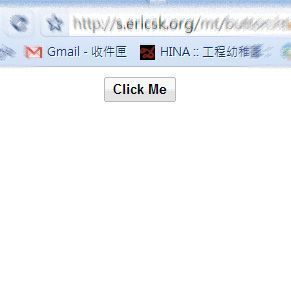
在 [噗浪](http://www.plurk.com/hinablue/invite?ref=blog.hinablue.me) 上看到 [ericsk](http://blog.ericsk.org/?ref=blog.hinablue.me) (的 [噗浪](http://www.plurk.com/ericsk?ref=blog.hinablue.me)) 所寫的按鈕，我覺得應該來寫 part 5 了。至於為什麼是按鈕，那就先來看看 ericsk 所寫的按鈕：

![按鈕圖示](https://blog.hinablue.me/content/images/2014/Jun/3150083359.jpg)

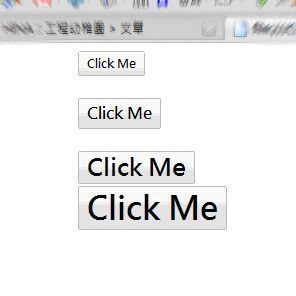
很單純的 Click Me 也許沒什麼稀奇的，再來看看這個：

![按鈕圖示](https://blog.hinablue.me/content/images/2014/Jun/6520000171.jpg)

它還是 Click Me 也沒什麼稀奇的，只是字越來越大而以。那麼，不知道各位會怎麼製作這樣的按鈕？當然，用圖片是最快的做法，不過，這四個按鈕你需要用多少張圖片呢？12 張？免！8 張？免！6 張？免！ericsk 告訴我們，\*\*一張都不用！\*\*為什麼？

為什麼？

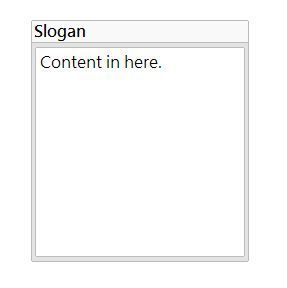
這就是 CSS 應用的極致，所謂神人一出手，便知有沒有。延伸 ericsk 的例子，我們繼續來看常見的對話框：

![對話框](https://blog.hinablue.me/content/images/2014/Jun/2885265154.jpg)

圖片？如果這種很乾淨的對話框還用上圖片的話，光切圖就是很頭大的一件事情。

```html
	<!DOCTYPE HTML PUBLIC "-//W3C//DTD HTML 4.01//EN" "http://www.w3.org/TR/html4/strict.dtd"> 
	<html> 
	    <head> 
	        <meta http-equiv="Content-Type" content="text/html;charset=UTF-8"> 
	        <style type="text/css">
	        <!--
	        .dg-inline-block {
	            display:-moz-inline-box;
	            display:inline-block;
	            zoom: 1;
	            *display:inline;
	        }
	        .dg-dialog {
	            border: 0 none;
	            margin:0 10px 2px 2px;
	            left: -2px;
	            position: relative;
	        }
	        .dg-dialog-outer {
	            border-color: #bbb;
	            border-style: solid;
	            border-width: 1px 0;
	            padding: 0;
	            margin:0;
	        }
	        .dg-dialog-inner {
	            background: #e3e3e3;
	            border-color: #bbb;
	            border-style: solid;
	            border-width: 0 1px;
	            margin: 0 -1px;
	            position: relative;
	            padding: 0;
	            *overflow: hidden;
	            *left: -1px;
	        }
	        .dg-dialog-slogan {
	            background: #fff;
	            background: #f9f9f9;
	            border-bottom: 1px solid #bbb;
	            height: auto;
	            overflow: hidden;
	            display: block;
	        }
	        .dg-dialog-slogan-content {
	            padding: 0 2px;
	        }
	        .dg-dialog-container {
	            background: #fff;
	            margin: 4px 4px;
	            border-color: #bbb;
	            border-style: solid;
	            border-width: 1px 0;
	        }
	        .dg-dialog-container-content {
	            margin: 0;
	            padding: 4px 4px;
	            border-color: #bbb;
	            border-style: solid;
	            border-width: 0 1px;
	            margin: 0 -1px;
	            width: 200px;
	            height: 200px;
	        }
	        -->
	        </style>
	    </head> 
	    <body> 
	        <div id="dialog-box">
	            <div class="dg-dialog dg-inline-block">
	                <div class="dg-dialog-outer dg-inline-block">
	                    <div class="dg-dialog-inner dg-inline-block">
	                        <div class="dg-dialog-slogan">
	                            <div class="dg-dialog-slogan-content">
	                                <strong>Slogan</strong>
	                            </div>
	                        </div>
	                        <div class="dg-dialog-container">
	                            <div class="dg-dialog-container-content">
	                                <span>Content in here.</span>
	                            </div>
	                        </div>
	                    </div>
	                </div>
	            </div>
	        </div>
	        <br />
	    </body> 
	</html>

```

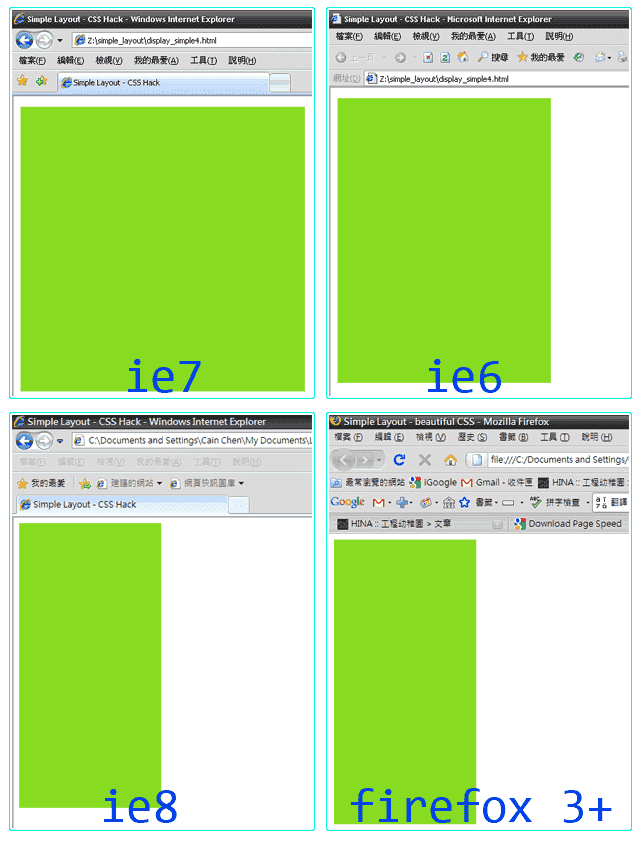
接著我們來講一些關於 CSS Hack 的事情，範例大多都可以從 Google 大神那找到，不過省事點，我幫各位找到 [這個地方](http://centricle.com/ref/css/filters/?ref=blog.hinablue.me)，可以參考一下。表格不是很複雜，不過你需要熟悉 CSS Selector 的操作方式看起來比較不會那麼吃力。另外，我挑兩個簡單的 CSS Hack 來說明一下。

![CSS Hack](https://blog.hinablue.me/content/images/2014/Jun/9640273526.png)

當然，IE8 與 Firefox 3+ 執行結果肯定是一樣的，那麼 IE6+7 發生了甚麼事？我們看下去。

```html
	<!DOCTYPE html PUBLIC "-//W3C//DTD XHTML 1.1//EN" "http://www.w3.org/TR/xhtml11/DTD/xhtml11.dtd">
	<html xmlns="http://www.w3.org/1999/xhtml" xml:lang="zh-TW">
	<head profile="http://gmpg.org/xfn/11">
	<meta http-equiv="content-Type" content="text/html; charset=UTF-8" />
	<title>Simple Layout - CSS Hack</title>
	<style type="text/css">
	<!--
	#container {
	    width: 200px;
	    height: 400px;
	    background-color: rgb(135,220,34);
	    *width: 400px;
	    _width: 300px;
	}
	-->
	</style>
	</head>
	<body>
	<div id="container">
	</div>
	</body>
	</html>

```

另外，ericsk 也提及過 [CSS 垂直對齊](http://www.plurk.com/p/uqi5t?ref=blog.hinablue.me) 的奧義，你可以 [去看看](http://www.jakpsatweb.cz/css/css-vertical-center-solution.html?ref=blog.hinablue.me)。至於我嘛，關於 CSS 我目前也想不到其它有趣的東西了，所以就來做個總結吧（無責）。

感謝收看！

ps. 之前的文章在這裡：

- [\[Layout tech.\] Web Design note with XHTML/CSS](https://blog.hinablue.me/entry/working-note-about-web-design-xhtml-and-css/)
- [\[Layout tech.\] Web Design note with XHTML/CSS part 2](https://blog.hinablue.me/entry/working-note-about-web-design-xhtml-and-css-part-2/)
- [\[Layout tech.\] Web Design note with XHTML/CSS part 3](https://blog.hinablue.me/entry/working-note-about-web-design-xhtml-and-css-part-3/)
- [\[Layout tech.\] Web Design note with XHTML/CSS part 4](https://blog.hinablue.me/entry/working-note-about-web-design-xhtml-and-css-part-4/)